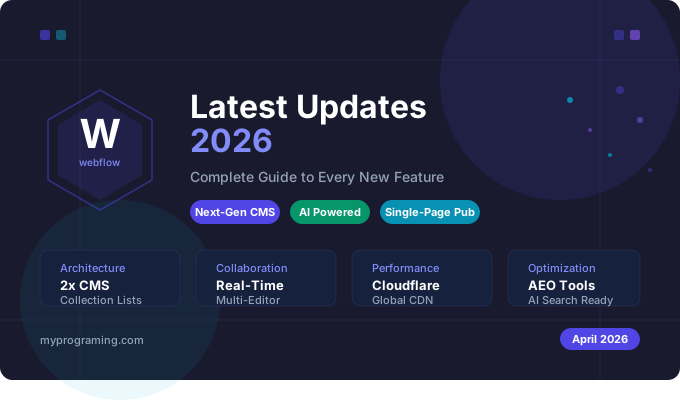
Webflow has never moved faster than it has in 2026. From a completely overhauled CMS architecture to AI-powered SEO tools, single-page publishing, and real-time collaboration — the platform has transformed itself from a powerful website builder into what it now calls a Website Experience Platform (WXP).
Whether you are a freelance designer, a development agency, or an in-house marketing team, understanding these updates is critical to staying competitive. In this comprehensive guide, we cover every major Webflow update released in 2026 — what each feature does, why it matters, and how you can start using it today.
Let us dive in.
1. Next-Gen CMS Architecture — The Biggest Update in Webflow History
Release Date: April 9, 2026 (all customers)
This is arguably the most significant update Webflow has ever shipped. All Webflow sites have now been migrated to the next-gen CMS architecture, unlocking expanded design flexibility critical for AI-driven discovery.
The new architecture delivers powerful upgrades across design flexibility, storage, and performance:
- 2x per-page Collection Lists — up to 40 Collection Lists per page (previously 20)
- 5x nested Collection Lists — support for up to 10 nested lists per page
- 10x more items per nested Collection List — up to 100 items per nested list
- Multi-level nesting — design up to three layers deep with CMS data, up from just one
What does this mean for you in practice? If you run a blog, portfolio, e-commerce site, or any content-heavy website on Webflow, you can now build far more sophisticated content structures without hitting the old limits. Think of related posts sections, nested category pages, multi-level product filtering, and interconnected content experiences — all of which were previously limited or impossible.
This architectural foundation sets the stage for continued increases in CMS data flexibility and scale, more robust APIs, and new capabilities that help brands on Webflow get discovered, understood, and cited by AI engines.
The best part? You do not need to do anything. The migration is automatic for all customers on Starter through Business Site plans, as well as Ecommerce plans.
2. Single-Page Publishing — Faster Team Workflows
Release Date: April 8, 2026
If you work in a team, this update will immediately change how you collaborate. You can now publish single pages independently without triggering a full-site publish, so your teams can move faster with confidence.
Previously, publishing any change to your Webflow site meant triggering a full site publish — which could overwrite or delay work being done by other team members on different pages. This was a consistent frustration for agencies and larger marketing teams.
With single-page publishing, here is what changes:
- A designer can update the homepage and publish it without affecting a developer working on a landing page
- A content editor can push a blog post live without triggering a full site rebuild
- Teams working across multiple regions or locales can publish their changes independently
- Time-sensitive updates — like a flash sale banner or a press release — can go live in seconds
This is a workflow game-changer for any team with more than one person touching the site.
3. Locale-Specific Access Control — Multilingual Teams Rejoice
Release Date: April 7, 2026
Locale-specific access control lets you scope contributor editing to specific locales so regional teams work in their language without touching the primary locale.
This update is particularly powerful for global brands and agencies managing multilingual websites. Here is a real-world example: if your site has English as the primary locale, and you also publish in Spanish, French, and German, you can now assign your Spanish-speaking content team access to only the Spanish locale. They cannot accidentally edit or overwrite the English primary locale — or any other language.
Benefits of locale-specific access control:
- Prevents accidental changes to the primary locale
- Allows regional marketing teams to work autonomously
- Reduces the need for central review before every content change
- Makes it easier to scale a multilingual content operation
- Pairs perfectly with single-page publishing for regional teams
Combined with Webflow’s Localization feature (which is now available to all users), this makes Webflow one of the strongest platforms for building and managing multilingual websites without the complexity of external plugins or third-party translation tools.
4. AI-Powered SEO and AEO Tools
Release: 2025–2026 (ongoing)
Search is changing. Google, ChatGPT, Perplexity, and other AI-powered engines are increasingly serving answers directly rather than just listing links. This is where Answer Engine Optimization (AEO) comes in — and Webflow has built native tools to help you optimize for both traditional SEO and AI-driven discovery.
Webflow’s AI-powered SEO and AEO tools bring together site-wide and page-level audits, automatic generation of meta titles, alt text, and schema markup, and a unified workflow — all designed to keep your site visible, efficient, and aligned with the evolving search landscape.
Key AI SEO capabilities in Webflow 2026:
- Automatic meta title generation — AI suggests optimized titles based on your content
- Alt text generation — images automatically get descriptive alt text for accessibility and SEO
- Schema markup automation — structured data is added without writing any code
- Site-wide SEO audits — identify issues across all pages from a single dashboard
- LLM content optimization — automatically format content for better understanding by AI engines
More than half of marketing leaders plan to prioritize optimization for AI-driven search and summaries in 2026 — and Webflow is giving them the tools to do it natively, without needing additional plugins or third-party SEO software.
5. Data Warehouse Integration for Analyze & Optimize
Release Date: April 1, 2026
You can now connect your data warehouse to Analyze & Optimize and receive daily data exports.
This is a major upgrade for data-driven teams. Instead of being limited to Webflow’s own analytics dashboard, you can now pipe your site data directly into your own data warehouse — whether that is Google BigQuery, Snowflake, Amazon Redshift, or another platform.
Who benefits most from this feature:
- Enterprise teams that need to combine website data with CRM, sales, and marketing data
- Analysts who need to build custom reports and dashboards beyond what Webflow’s UI offers
- Businesses running A/B tests who need granular data for statistical analysis
- Companies with compliance requirements that mandate data storage in specific locations
Combined with Webflow Analyze (cookieless analytics) and Webflow Optimize (native A/B testing), this gives enterprise users a complete, first-party data stack built entirely within the Webflow ecosystem.
6. Light and Dark Dashboard Theme
Release Date: March 30, 2026
You can now select a Light or Dark theme for the Webflow Dashboard — your preference saves across sessions and workspaces.
While this may seem like a small quality-of-life improvement, it is one that many designers and developers have requested for years. Working long hours in a bright interface is genuinely tiring. Dark mode reduces eye strain, especially for developers and designers who spend 8+ hours a day inside the Webflow Designer or Dashboard.
Your theme preference is saved per account — so whether you switch between devices or workspaces, Webflow will always remember your preference.
7. Real-Time Multi-Editor Collaboration
Release: Available now
Webflow now allows multiple editors to work on the same page at once. This real-time view removes version conflicts and helps content, design, and development stay aligned.
This is one of the most requested features from agencies and in-house teams. Previously, Webflow would warn you if someone else was editing the same page — and in some cases, changes could conflict or overwrite each other. Now, you can see other editors working in real time, just like in Google Docs.
Practical use cases:
- A designer and a copywriter working on the same landing page simultaneously
- A developer and a marketer updating different sections of the homepage together
- During a live campaign launch, multiple team members making last-minute changes without stepping on each other
8. Cloudflare-Powered Hosting Infrastructure
Release: Completed in 2025–2026
Webflow has migrated its entire hosting infrastructure to Cloudflare’s global network. Spanning 330 cities across 125 countries and connecting to 13,000 networks, Cloudflare’s infrastructure means faster load times, stronger security, and more reliable uptime for all Webflow sites.
For businesses, this translates directly into:
- Better Core Web Vitals scores — which directly affect Google rankings
- Faster page loads for visitors anywhere in the world
- Enterprise-grade DDoS protection built in by default
- Improved reliability and uptime SLAs
You do not need to configure anything. If your site is hosted on Webflow, you are already benefiting from this infrastructure upgrade.
9. Legacy Editor Retirement — Critical Action Required
Retirement Date: August 4, 2026
This is the most important update that many Webflow users are not yet aware of. The legacy Webflow Editor is being retired on August 4, 2026. It is being replaced by a new in-context editing experience integrated directly into the platform. The core functionality (editing text, images, and CMS content without Designer access) remains, but the interface and workflow are changing. Teams should plan their transition before the deadline.
The new in-context editing experience allows content changes to happen directly on the live page canvas — which is actually a significant improvement over the old Editor. Instead of seeing a simplified view of the page, editors now see exactly what the live page looks like and can make changes in context.
What you need to do before August 4, 2026:
- Identify all team members and clients who currently use the legacy Editor for content updates
- Train them on the new in-context editing experience
- Update any documentation or onboarding materials that reference the old Editor
- Test your CMS workflows in the new system before the legacy Editor is retired
10. User Accounts Feature — Permanently Disabled
Disabled: January 29, 2026
As of January 29, 2026, User Accounts functionality has been disabled on all Webflow sites. The related documentation has been removed from the developer site.
If your Webflow site had a members area, gated content, or user login functionality powered by Webflow’s native User Accounts feature, this feature no longer works. You need to migrate to an alternative solution.
Popular alternatives for Webflow membership and user authentication:
- Memberstack — the most popular Webflow-compatible membership solution
- Outseta — all-in-one membership, CRM, and billing
- Webflow Logic + Xano — for custom backend logic
- Auth0 or Clerk — for developer-built authentication flows
11. Developer API and CMS API Improvements
Release: Ongoing throughout 2025–2026
Webflow has significantly expanded its developer API in 2026. Key improvements include:
- skipInvalidFiles parameter — when creating or updating CMS items with attachments, you can now use the skipInvalidFiles parameter to handle problematic files more efficiently. When set to true, invalid files are skipped and processing continues.
- publishedPath field in webhooks — the new publishedPath field in webhook payloads gives you the exact URL path to navigate to pages on your site, making it much easier to track page changes beyond just the page ID and title.
- Page branch support — localization endpoints now support reading and writing to page branches, letting you manage draft pages and components separately from published content
- workspace_settings event — auditors can now track when AI features are enabled or disabled on a Webflow Workspace
These improvements make it significantly easier to build custom integrations, automated content pipelines, and headless Webflow implementations.
12. Webflow AI — Built Into Every Plan
Release: Available to all plans
Every Webflow plan now includes Webflow AI, which brings several capabilities directly into the build and content workflow. This includes:
- AI Assistant — a conversational partner inside the Designer that helps with creating layouts, refactoring sections, and suggesting design improvements
- AI-Generated Code Components — generate custom components using natural language prompts
- CodeGen Web Apps via Webflow Cloud — build and deploy web apps directly from Webflow using AI-generated code
- Automatic content optimization for LLMs — format your site’s content so it is better understood and cited by AI search engines
The AI Assistant is particularly useful for designers who want to explore layout ideas quickly, and for teams that need to iterate on sections without starting from scratch each time.
13. Smarter Form Management and Spam Filtering
Release: Available now
You can now manage form settings and spam directly within Webflow. Spam submissions are filtered automatically, leaving you with accurate, high-quality enquiries.
For businesses that rely on contact forms, lead generation forms, or newsletter signups, this is a significant quality-of-life improvement. Previously, Webflow forms had no built-in spam protection — meaning your inbox could easily fill up with bot submissions that polluted your lead data.
The new spam inbox filters bot submissions automatically. You can still review flagged submissions if needed, so you do not miss any legitimate leads that were incorrectly filtered.
14. How to Use These Updates for Better SEO Rankings in 2026
All of these Webflow updates directly or indirectly impact your SEO performance. Here is how to leverage them:
Use the Next-Gen CMS for Programmatic SEO
With 2x more Collection Lists per page and multi-level nesting, you can now build programmatic SEO pages at scale. Create landing pages for every city, every product category, every use case — all powered by CMS data and all indexed by Google.
Enable AI-Powered Meta Titles and Alt Text
Turn on Webflow’s AI SEO tools to automatically generate optimized meta titles and alt text across your entire site. This is especially valuable if you have hundreds or thousands of CMS pages that would otherwise require manual optimization.
Optimize for AEO with Structured Data
Use Webflow’s automatic schema markup generation to add FAQ, HowTo, Article, and Product schema to your pages. This helps AI engines like ChatGPT, Perplexity, and Google’s AI Overviews understand and cite your content.
Leverage Cloudflare Infrastructure for Core Web Vitals
Webflow’s Cloudflare-powered hosting gives you a strong foundation for Core Web Vitals — particularly Largest Contentful Paint (LCP) and Time to First Byte (TTFB). Combine this with Webflow’s built-in image optimization and lazy loading to achieve excellent page speed scores.
Use Single-Page Publishing to Keep Content Fresh
Google rewards fresh, regularly updated content. With single-page publishing, you can update and publish individual pages without the friction of a full site deploy — making it much easier to maintain a regular content publishing cadence.
Build Multilingual SEO with Localization
Webflow’s native Localization feature combined with locale-specific access control makes it straightforward to rank in multiple languages. Use hreflang tags (which Webflow generates automatically for localized sites) to signal to Google which language version to show for each audience.
Conclusion: Is Webflow the Best Website Platform in 2026?
The 2026 updates make a compelling case that Webflow is no longer just a premium website builder — it has evolved into a complete Website Experience Platform. The next-gen CMS architecture, AI-powered tools, real-time collaboration, enterprise-grade infrastructure, and AEO optimization capabilities put it ahead of most alternatives for serious businesses and professional web teams.
The most impactful updates this year are:
- The next-gen CMS migration — unlocking a new level of content architecture for everyone
- Single-page publishing — removing the biggest bottleneck for collaborative teams
- AI-powered SEO and AEO tools — future-proofing your search strategy
- The legacy Editor retirement — a critical transition that teams need to prepare for before August 4, 2026
If you are already on Webflow, now is the time to explore these new capabilities and make sure your team is prepared for the Editor transition. If you are considering moving to Webflow, 2026 is arguably the best time to make the switch.
Have questions about any of these Webflow updates? Drop a comment below — we read and respond to every one.